
Easy CD-DA Extractor is the most comprehensive multi format audio converter and is extremely easy to use.
Rips audio CDs, converts audio files, and burns CDs & DVDs. All popular audio formats are supported. Includes editing of metadata, and copying of CDs & DVDs.
Unique features of Easy CD-DA Extractor:
- Intuitive and easy-to-use interface
- Best audio codecs out of the box for best audio quality
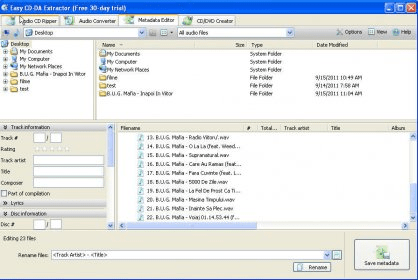
- Exact and reliable CD ripping with error detection and two-pass verification of audioEasy CD-DA Extractor is a very complete solution for ripping and converting your audio compact disks into music files that can be easily stored on you PC. It has an easy-to-use interface, which lets you carry out three main tasks: Rip audio CDs, Convert audio files between many formats, and create audio CDs, MP3 CD/DVDs, Data CD/DVDs and Video DVDs.
Main features of Easy CD-DA Extractor:
Audio CD Ripper. You can easily insert your audio CDs and select which tracks you desire to extract, and save them to your PC. Metadata of your audio compact disc can be easily obtained from freedb or MusicBrainz disc databases using your Internet connection. Additional ID3, like Covert art, can be searched and downloaded from Amazon web site as well. Easy CD-DA Extractor supports the following output formats: 3G2, 3GP, ACC, AIFF, APE, FLAC, MP1, MP2, MP3, M4A (ACC), M4A (accPlus), M4A (Apple Lossless), M4B, MP4, MPC, OGG, WAV, WMA, and WV.
Audio Converter. You can drag and drop as many files as you desire to convert them between many output formats. You can also edit metadata like Artist, Title, Album, Lyrics, etc.
CD/DVD Creator. Here you can create and burn an Audio CD, an MP3 CD/DVD, a Data CD/DVD, and a Video DVD. All you have to do is drag and drop your multimedia files, adjust some record options, and that's all, your CDs or DVDs will be burned immediately.
New features of Easy CD-DA Extractor 12.0:
Audio CD ripping engine has been improved, so it will detect any CD error accurately. You can add new tags like Rating, Lyrics, Disc #, Total discs, and Total tracks. You will be able to see file properties like Length, Bit rate, Bit depth, Sample rate, Channels, and Filesize in the Audio Converter Tab. Create and burn disc images from and to CD/DVD/BD discs. Audio Codecs updated. A new better user interface.





Comments